Cấu hình SSH key cho nhiều tài khoản GitHub
Dùng nhiều SSH key và alias trong ~/.ssh/config để làm việc với nhiều tài khoản GitHub trên cùng một máy — setup một lần, dùng mãi không lo lỗi.
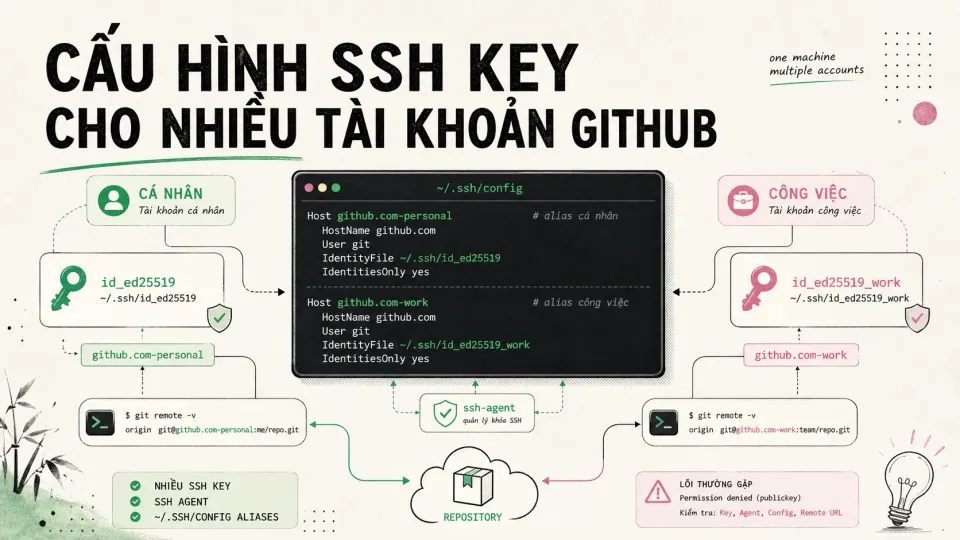
Table of Contents
Hi friend! 👋
Tuần trước mình setup laptop mới. Có 2 tài khoản GitHub — một cá nhân, một cho side project. Clone repo cá nhân: êm ru. Clone repo side project: lỗi. Permission denied (publickey).
Mình Google cả tiếng. Rồi nhận ra: vấn đề không phải ở key. Vấn đề là SSH không biết phải dùng chìa nào, vì cả hai tài khoản đều trỏ về cùng một địa chỉ github.com.
📖 Nói nhanh cho bạn chưa quen:
SSH key giống như cặp chìa khoá nhà. Bạn giữ một chiếc (private key) — không cho ai mượn. Chiếc còn lại (public key) lắp ở cửa nhà. Khi muốn vào, hệ thống kiểm tra: chìa này có khớp với ổ không? Nếu có → mở cửa. Nếu không → từ chối.
Vấn đề của mình là: có 2 ổ khoá (2 tài khoản GitHub), nhưng cả hai đều ghi cùng một địa chỉ github.com. SSH bối rối — không biết phải dùng chìa nào.
🔄 Hành trình của mình:
- Lần 1: Xoá key cũ, tạo key mới mỗi lần clone → chạy được, nhưng mệt. Mỗi lần đổi project phải nhớ xoá key cũ, thêm key mới.
- Lần 2: Dùng
ssh-agent→ đỡ phải gõ passphrase mỗi lần. Tốt hơn, nhưng vẫn phải nhớ manually switch key. Và thỉnh thoảng quên → lại lỗi. - Lần 3: Cấu hình alias trong
~/.ssh/config+includeIftrong gitconfig → mỗi tài khoản một “địa chỉ riêng”. Git tự chọn đúng key, đúng email. Setup một lần, dùng mãi.
Giờ thì clone repo nào cũng êm. Và quan trọng hơn: không commit nào nhầm email nữa — chuyện này còn nguy hiểm hơn lỗi SSH nhiều.
🎯 Bài này hữu ích nếu bạn:
| Bạn là… | Áp dụng để… |
|---|---|
| Dev cá nhân | Tách email cá nhân khỏi repo open source / side project |
| Freelancer | Tách biệt project client và side project |
| Team lead | Chuẩn hoá git config cho cả team, tránh commit nhầm |
| Người mới | Setup đúng từ đầu, không phải debug sau này |
💡 Chưa cần làm hết. Tạo 1 key cho tài khoản cá nhân, test clone xong hôm nay. Tài khoản side project thì thêm sau — khi nào gặp lại Permission denied, quay lại đây.
🔧 Bắt đầu setup
Bước 1: Tạo SSH key cho từng tài khoản
# Xem có key cũ chưa, tránh đặt trùng tên rồi ghi đèls -al ~/.ssh
# Tạo key personalssh-keygen -t ed25519 -C "personal@email.com" -f ~/.ssh/id_ed25519_github_personal
# Tạo key cho side projectssh-keygen -t ed25519 -C "side@email.com" -f ~/.ssh/id_ed25519_github_side
📖 Tại sao dùng ed25519? Nó giống như phiên bản nâng cấp của RSA — key ngắn hơn, tạo nhanh hơn, và an toàn hơn. GitHub cũng khuyến khích dùng từ 2021.
Nên đặt passphrase cho key. Giống như két sắt có mã — kẻ trộm có lấy được file key cũng không mở được. --apple-use-keychain sẽ lưu passphrase vào Keychain, không phải gõ lại mỗi lần — tiện như không passphrase nhưng vẫn an toàn nếu mất máy.
Bước 2: Nạp key vào ssh-agent
eval "$(ssh-agent -s)"ssh-add --apple-use-keychain ~/.ssh/id_ed25519_github_personalssh-add --apple-use-keychain ~/.ssh/id_ed25519_github_side📖 ssh-agent là gì? Tưởng tượng nó như một quản gia giữ chìa khoá cho bạn. Thay vì mỗi lần mở cửa phải nhập mã két, bạn bảo quản gia: “giữ hộ tôi, khi nào cần thì lấy ra”. Quản gia này giữ key đã unlock trong RAM, dùng lại nhiều lần không phải gõ passphrase.
Kiểm tra key đã nạp:
ssh-add -lNếu thấy 2 key hiện ra là ổn.
Bước 3: Cấu hình ~/.ssh/config — phần quan trọng nhất
Host *  UseKeychain yes  AddKeysToAgent yes
# Personal accountHost github.com-personal  HostName github.com  User git  IdentityFile ~/.ssh/id_ed25519_github_personal
# Side project accountHost github.com-side  HostName github.com  User git  IdentityFile ~/.ssh/id_ed25519_github_side
📖 Alias hoạt động thế nào? Thay vì cả hai tài khoản đều gọi github.com (gây nhầm lẫn), mình đặt cho mỗi tài khoản một “biệt danh”: github.com-personal và github.com-side. Khi cần kết nối, SSH nhìn vào alias này → biết phải dùng key nào.
Quan trọng: Host ở đây là alias, không phải địa chỉ thật. Khi clone repo phải dùng alias tương ứng.
Bước 4: Thêm public key vào GitHub
Làm lần lượt từng key (nếu chạy cả 2 lệnh pbcopy liên tiếp thì chỉ key cuối còn trong clipboard):
# 1. Copy key personalpbcopy < ~/.ssh/id_ed25519_github_personal.pubVào tài khoản personal trên GitHub → avatar → Settings → SSH and GPG keys → New SSH key → dán key vừa copy.
# 2. Copy key sidepbcopy < ~/.ssh/id_ed25519_github_side.pubVào tài khoản side project → làm tương tự.
Bước 5: Kiểm tra kết nối
ssh -T git@github.com-personalssh -T git@github.com-sideNếu thành công sẽ hiển thị:
Hi <username>! You've successfully authenticated...Nếu báo lỗi → xem phần xử lý bên dưới.
Bước 6: Clone repo đúng alias
# Repo cá nhân — dùng alias personalgit clone git@github.com-personal:your-username/your-repo.git
# Repo side — dùng alias sidegit clone git@github.com-side:side-username/side-project.git
Nếu repo đã clone bằng URL sai:
git remote set-url origin git@github.com-side:side-username/side-project.git💡 Nguyên tắc vàng: Không bao giờ dùng git@github.com:... mặc định nếu trên máy có nhiều account. Luôn dùng alias.
Bước 7: Cấu hình Git user/email tự động — tránh commit nhầm
Phần này quan trọng không kém SSH. Commit bằng email side project vào repo cá nhân (hoặc ngược lại) = nhầm lẫn, khó theo dõi. Dùng includeIf để mỗi repo tự dùng đúng email.
File ~/.gitconfig (mặc định dùng personal):
[user]    name = Your Personal Name    email = personal@email.com
[includeIf "gitdir:~/side/"]    path = ~/.gitconfig-side
[includeIf "hasconfig:remote.*.url:git@github.com-side:"]    path = ~/.gitconfig-side
File ~/.gitconfig-side:
[user] name = Your Side Project Name email = side@email.com📖 includeIf hoạt động thế nào? Nó như một rule tự động: “Nếu repo nằm trong thư mục ~/side/ HOẶC có remote URL chứa github.com-side → load thêm file ~/.gitconfig-side”. Không cần nhớ switch, Git tự làm.
Cách hoạt động:
- Repo trong thư mục
~/side/hoặc có remote URL chứa aliasgithub.com-side→ tự dùng email side project - Repo khác → dùng email personal
Kiểm tra user/email trong repo:
git config user.namegit config user.emailXử lý lỗi thường gặp
Permission denied (publickey).fatal: Could not read from remote repository.Nguyên nhân & cách xử lý:
- Clone chưa dùng alias → sửa lại URL hoặc clone lại bằng
github.com-side/github.com-personal - Key chưa add vào ssh-agent →
ssh-add --apple-use-keychain ~/.ssh/id_ed25519_github_side - Public key chưa add vào GitHub
- Quyền file sai →
chmod 700 ~/.ssh && chmod 600 ~/.ssh/* - Debug chi tiết →
ssh -vT git@github.com-side(flag-vcho verbose, thấy được SSH đang làm gì)
✅ Checklist áp dụng ngay:
- Tạo SSH key cho tài khoản chính (5 phút)
- Test clone 1 repo với key đó
- Khi có tài khoản thứ 2 → thêm alias vào
~/.ssh/config - Setup
includeIfnếu dùng chung máy cho side/personal - Kiểm tra email trong repo hiện tại:
git config user.email
💡 Đúc kết:
Không bao giờ dùng
git@github.commặc định nếu có nhiều account. Alias một lần, yên tâm mãi.
Hi friend! Nếu bạn cũng từng dính lỗi Permission denied này, hoặc có cách setup khác gọn hơn — chia sẻ với mình nhé. Mình luôn muốn học thêm từ kinh nghiệm của bạn.
Hẹn gặp lại ở bài sau! 👋